
If you are about to create a new ASP.NET Core MVC 3.0 application, you may need to know about some changes introduced for routing in the Startup.cs file.
ASP.NET Core MVC 2.2 and previous versions
Let’s just remember how things are in previous versions – ASP.NET Core MVC 2.2 and prior. In the Startup.cs file, in order to set up the MVC project, you just need to add the following lines of code into Configure and ConfigureServices methods:
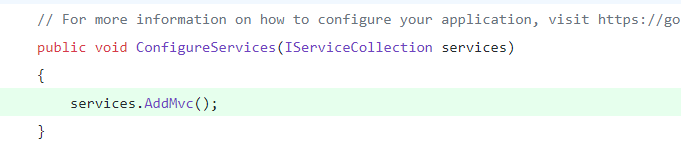
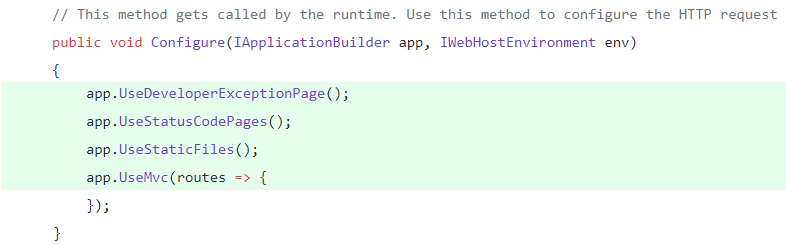
Nonetheless, if you do that in ASP.NET Core MVC 3.0, you will have issues when debugging your app – you will see a warning that suggests you to set a value in the Configure method, so the old “app.UseMvc” extension method can work.
The reason why you may have trouble with the old “UseMvc” method is because .NET Core MVC team has changed the concept of routing in version 3.0. You can see all the details here: Routing in ASP.NET Core
Routing in ASP.NET Core MVC 3.0
From now on, in ASP.NET Core MVC 3.0, to set up routing in you app, you must replace the “UseMvc” extension method with the following code:
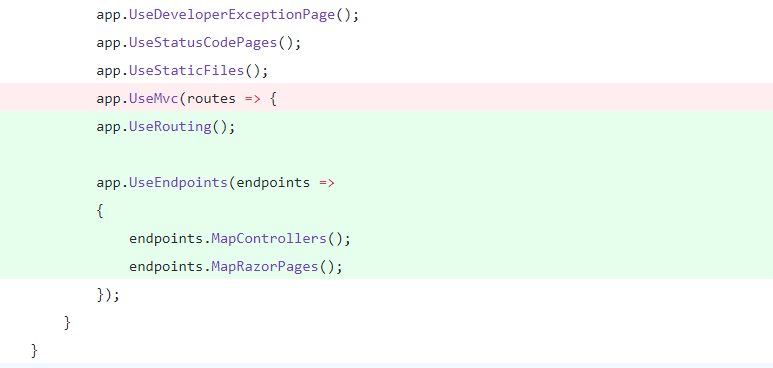
As you must be familiar with, red lines are deleted, while green lines are added. See that I had to include “app.UseRouting” and “app.UseEndpoints” calls to extension methods, so my app can debug properly.
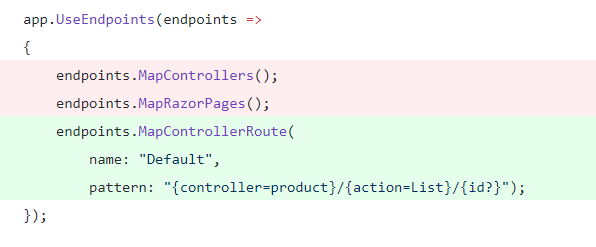
Moreover, if you are wondering how to tell MVC about mapping specific routes in this new approach, you only need to write something like the following code, within the “UseEndpoints” extension method:
My general thought is on every release of our choice of technology, we must dig a little into what is new, why it is so and how can we take advantage of those changes. It is much better spend few minutes reading some release notes, than just jiggery-pokery our code to do what it is suppose to do.
 Vicluar Daniel Merchan