
When creating a ASP.NET Core application, there are many things to take into account. Besides the structure of the solution, the different nuget packages to support specific functionalities and working with an API that allows the web application to move easily from Windows to Linux and vice versa, there is an important topic to keep in mind that avoid many headaches and problems going forward. That is avoid at all cost having those values considered “configurable” hard coded into our code.
In my early days as Software Developer, I heard a most experience folk saying something like “…everything that is between double quotes inside our source code, is code smell”. Previously to .NET Core, we used to keep our configuration values in a web.config file and get those values through the Configuration Manager (to see some examples of this approach, go to this post from Scott Allen).
.NET Core not only makes everything faster and cross platform, but it also makes few things simpler. One of those is the Configuration settings.
As you may know, .NET Core enforces to keep the configuration values inside an “appsettings.json” file. The way to access those values from your code has a few flavors, something that I am going to show here:
Configuration settings through IConfigurationRoot
The easiest way to get access to your configuration values is calling them directly from code like:

This approach, requires you have something like this in your appsettings.json file:
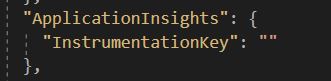
The approach is easy: ask for the configuration value you need by explicitly naming the path inside the json file.
The problem with this option is that it is error prone. You may misspell a word a get a null or default value. Something that can drive you crazy (I faced this issue in my first .NET Core project).
As a conclusion, it is easy to do but error prone.
Options Pattern
The improved option for getting the configuration settings values is the Option Patter implemented in ASP.NET Core. A Microsoft document state: “The options pattern uses classes to represent groups of related settings” (the full document about Options Pattern is here).
In this approach, you define a set of classes that represent the structure of your appsettings.json file. It could be a subset of the whole structure of the file. Then, ASP.NET Core maps the values in the appsettings.json file to the properties in the defined classes.
Let’s see an example:
Suppose you have the following appsettings.json file structure:
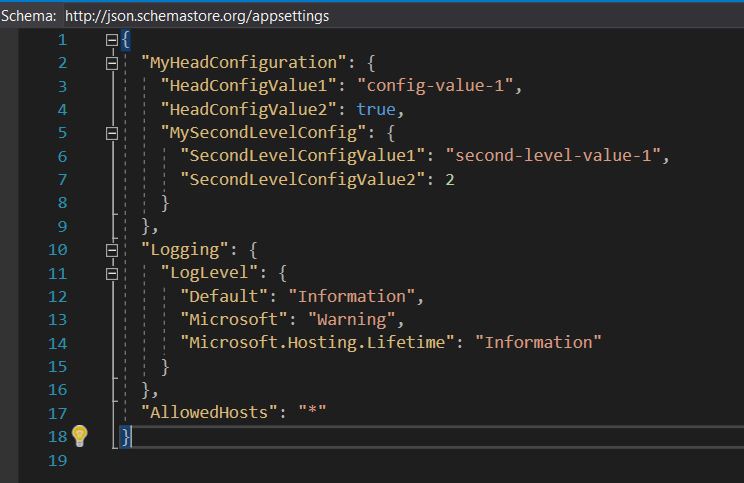
Let’s assume you need the values of “MyHeadConfiguration” section and its relatives. You can easily create the following class structure to represent the file structure:
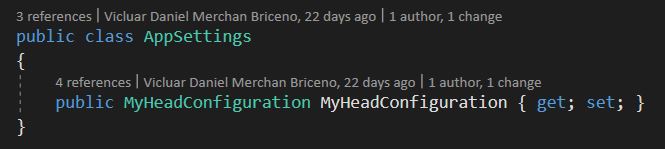
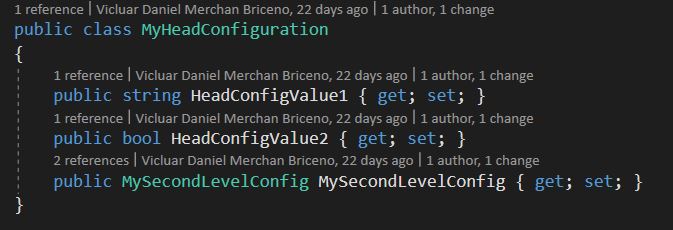
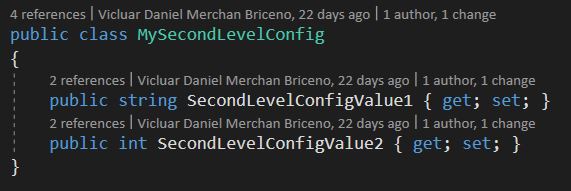
Then, you can easily tell the IServiceCollection to map out those values from the appsettings.json file like:

Finally, you can get those values in your required class by dependency injection as:
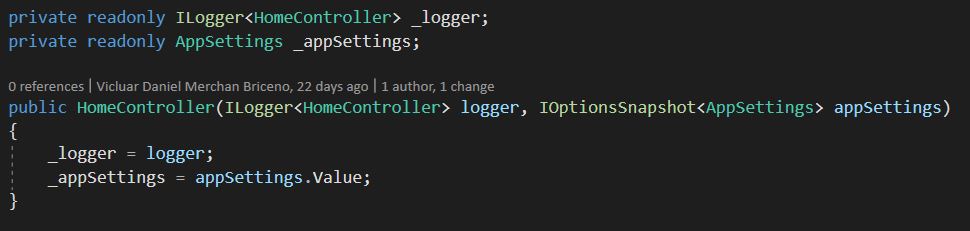
That is it! You get access to all values coming from the configuration file (appsettings.json file in this case).
Improving a little bit the access to configuration settings
So far, so good. Nevertheless, you may agree with me that not every class in your program needs access to the whole set of configuration values. It is true that most of those classes might need just a subset of the app settings values. For that situation, you have an option that allows you to keep the separation of concerns at a high level.
Let’s see:
Let’s assume that we have a controller in our app that only needs access to the “MySecondLevelConfig” section values. We can reuse the whole work we did before and just apply few changes to provide the controller only with the values it really needs. So, what we have to do is in the ConfigureServices method in the Startup class, ask the IServiceCollection to map out only the values that we really need as follows:

Finally, in your controller, through dependency injection, get the instance like this:

That’s all that we may need to provide only with the values of the “MySecondLevelConfig” section.
Overall, it is important to know and understand the different options available for getting the configuration settings into code. You can choose the one that fits you needs.
To see the full source code of the sample app, go to: https://github.com/vicluar/configuration-app-settings
 Vicluar Daniel Merchan