
The nature of distributed applications brought the fact that we must embrace failure. No matter how good you plan, architect or develop your applications, failures are always very likely to happen.
A clear example is when a web application needs to communicate to an external service through HTTP. Let’s say that for some reason, there is network fault. Sometimes, the app only needs to back off a little time and retry its requests. In other cases, the application identifies that there has been multiple retries with the same error result (for simplicity, let’s say a Not Found error). For these scenarios, a circuit breaker is a good patter to implement since it enables us to stop attacking the service which could probably cause a denial of service (DoS).
Fortunately, there are some proved patterns that help us overcome these kind of scenarios. Those patterns are: Retry and Circuit Breaker. In the following links, you will find valuable information about those patterns in the Azure architecture center:
- Retry Pattern: https://docs.microsoft.com/en-ca/azure/architecture/patterns/retry
- Circuit Breaker Pattern: https://docs.microsoft.com/en-ca/azure/architecture/patterns/circuit-breaker
With this in mind, let’s see how we can implement those patterns in our ASP.NET Core application through the use of Polly library.
Sample application:
The sample solution is very straight forward and it is aimed to showcase the scenario where we can test how the Retry and Circuit Breaker patterns work. Here is a close look:
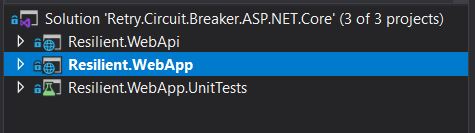
I will explain the purpose of each project within the solution:
- Resilient.WebApi: It is a web api based on the Visual Studio template. No changes have been made to it. Hence, the only functionality available is the weather forecast information.
- Resilient.WebApp: It is a ASP.NET Core MVC project. It gets the weather forecast information from the Web Api and render it into a html view.
- Resilient.WebApp.UnitTests: Just for unit test purposes.
Implementing IHTTPClientFactory
The first step is to make our classes to use a HTTPClient by injection through the IHTTPClientFactory. This avoids many well known issues with the HTTPClient object. To read more about those known issues, you can go to this very good article.
For our case, we are going to inject the HTTPClient by constructor as follows:
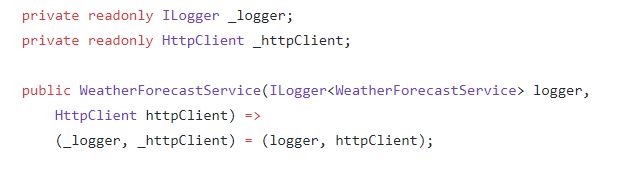
Now, at the startup class, in the ConfigureServices method, we must add the HttpClient instance as follows:

With all this code, we have the HttpClient object working in our class. Therefore, we will be able to call external services by HTTP with an easy.
Implementing the Retry and Circuit Breaker patterns
Now, we are ready to code the Retry and Circuit Breaker patterns by using Polly library.
First of all, we must add the following Nuget packages to our project:
- Polly
- Polly.Extensions.Http
- Microsoft.Extensions.Http.Polly
Thereafter, we must change the previous code in the ConfigureServices to include the Retry and Circuit Breaker policies, in addition to code the policies itself. For simplicity, I will show the full class code:
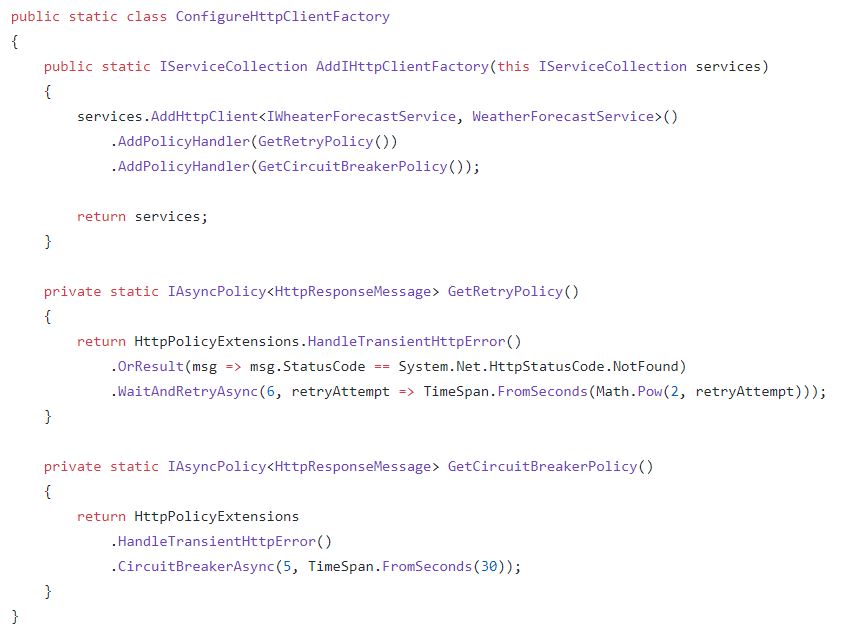
That is all the code we must write to create above mentioned policies.
To make sure everything is working properly, I tried myself the web application. In the following lines, you will see the Visual Studio console output:
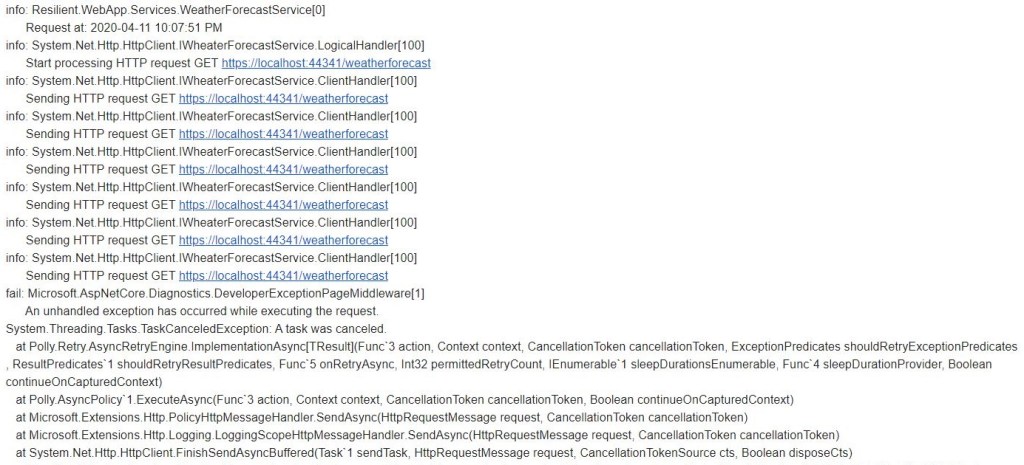
As you may see, the web application sends the HTTP request 6 times (the same number I set up in the Retry policy). If all of them fail, then the Circuit Breaks and stop sending HTTP request to the external service.
A quite simple, nice and straightforward solution to implement the Retry and Circuit Breaker patterns.
If you want to see the full code, go to my github and check it out: retry-circuit-breaker-asp.net-core
 Vicluar Daniel Merchan