
Given the nature of distributed applications, such as microservices, we as developers, devops engineers or software architects must implement tools and policies that enable us to monitor how good or bad our services are performing. It is the essence of a well established solution to have a very good understanding and monitor of all pieces of software, services and infrastructure under where our application runs. These kind of practices leads us to an excellent operation work, where we identify those elements that are failing before (it is the desirable state) the users notice it.
There are so many solutions out there that monitor, raise alerts and provide user interfaces where we can see at all times how good or bad our services are.
Now, when the time comes to develop a microservice architecture and many of those microservices are ASP.NET Core based, you must ensure that each service provides information about its health and – quite important as well – the health of its dependencies. This last point is quite important because we must define what healthy means to our services. In some scenarios, that is being up and running, in others – which is the must accepted – it is when the service is up and running as well as its dependencies (things like databases, external APIs, etc.)
This post shows how to implement Health Checks in those microservices based in ASP.NET Core.
Setting up Health Check library in ASP.NET Core service
First of all, Microsoft has developed a library, which has been included into ASP.NET Core 2.2 and beyond, that let you implement Health Checks easily in your ASP.NET Core solutions. That library is Microsoft.Extensions.Diagnostics.HealthChecks. According to Microsoft documentation, “Health check services and middleware are easy to use and provide capabilities that let you validate if any external resource needed for your application (like a SQL Server database or a remote API) is working properly.”
As that library is built in into ASP.NET Core, you only need to set it up in your Startup.cs file as follows:

Above code just calls the “AddHealthChecks” in the “ConfigureServices” method and adds a new endpoint to map the Health Checks by calling the method “MapHealthChecks” in the “Configure” method. Just by adding those couple of lines, your service will return a Health status for itself. At this point, if you go into “http://{yourserviceurl}/hc”, you will see a “200” response that would say “Healthy” (obviously, that is going to depend on the health of your service).
Health Check for dependent services
Microsoft and the ASP.NET Core team have added a way to extend the functionality of the Health Check library, so you will be able to add custom Health Checks for those services you want to. That is possible by implementing the “IHealthCheck” interface into the class that you want or need; then you can write your own custom logic for validating the health of your dependent services. You can see an example of how to do that in this link: Create health checks.
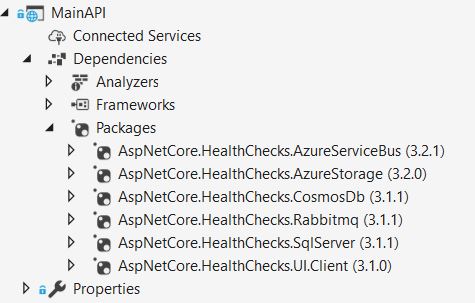
However, since your service may depend on several external services, chances are that you cannot implement custom Health Check for every one of them. Instead, you may want to have a easier option to ensure your services are healthy without writing so much code. For those scenarios, the AspNetCore.Diagnostics.HealthChecks library provides a separated nuget packages for several enterprise services you might use, such as SqlServer, Rabbitmq, Azure Service Bus, Azure Storage and many more. See the following image:
In our example, we are going to use the “AspNetCore.HealthChecks.SqlServer” library, so you will see how easy it is to add Health Checks to your service for the dependent SQL Server database. In the following image, you will see all the code that is needed for these purposes.

In the above code, you will notice that you only need to provide the connection string for the SQL Server database. Then, the Health Check library will do the work for you to check that the SQL Server database is available.
At this point, you will be able to say whether you service is healthy or not based on its health and the health of its dependent services. In our sample case, the health of the SQL Server database.
Using WatchDogs for monitoring the health of your services
Let’s say that you have a microservice architecture where more than 2 services are involved (for sure, the number of services may grow over time). You may monitor the health of one service and say that your solution is healthy. But when there are more than 2 microservices, chances are that things get harder.
It is cumbersome to monitor, for instance, the health of 6 microservices manually to ensure your system is healthy. It is highly possible that you forget one of those. Even if you have a board with a graphical interface for each microservice, that work would be hard to do.
For above cases, you can use a watchdog. Microsoft documentation says: “a watchdog is a separate service that can watch health and load across services, and report health about the microservices.”
The AspNetCore.Diagnostics.HealthChecks provides the AspNetCore.HealthChecks.UI that allows you to display the health check results for all configured URLs you may need.
Set up the WatchDog UI provided by AspNetCore.HealthChecks.UI is quite simple. You only need to create a separated service that will act as the watchdog service. Then, include “services.AddHealthChecksUI();” in the ConfigureServices method and “app.UseHealthChecksUI(config => config.UIPath = “/hc-ui”);” in the Configure method. Then, you must include the following lines in the “appsettings.json” file to tell the WatchDog which service to check the health to:

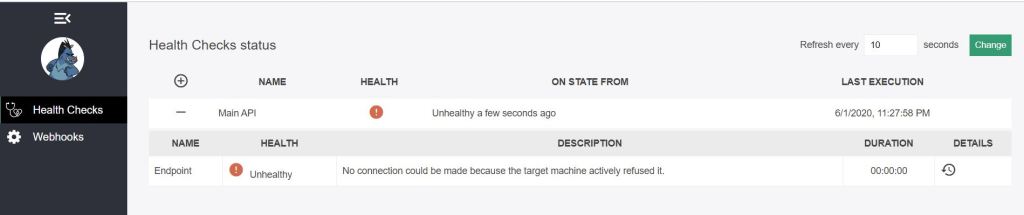
After doing that, by running the watchdog service and going into the web page “/hc-ui”, you will see a display like the following:
Remember that WatchDog service is the perfect place to put some logic for when your services are unhealthy. Actions such as sending alerts, restarting services and the like are perfect to be placed into the WatchDog.
If you want to see the full sample code, you can go here: health-check-asp.net-core.
 Vicluar Daniel Merchan